
Affiliate disclosure: TeckAtlas is reader-supported. If you buy through links on this page, we may earn a commission at no extra cost to you. Learn more.
Last updated: 10 October 2026. Prices change often, so always check the current price before you buy.
Looking for the best monitors under 15000 in India? A second screen makes work, study and gaming far more comfortable than squinting at a laptop. At under ₹15,000, a 24-inch Full HD IPS monitor with a high refresh rate is now easy to find.
We compared five of the best-rated 24-inch monitors on Amazon.in, from a ₹5,999 Acer with 144Hz to a 180Hz LG gaming monitor.
Table of Contents
Best monitors under 15000 in India: our picks at a glance
| Product | Best for | Price* | Buy |
|---|---|---|---|
| Acer EK240Y P6 (144Hz) | 144Hz at the lowest price | ₹5,999 | Buy on Amazon.in |
| BenQ GW2490 | long hours of office work and study | ₹8,399 | Buy on Amazon.in |
| Lenovo L24-4C (144Hz) | a 144Hz screen with built-in speakers | ₹8,399 | Buy on Amazon.in |
| LG 24GS65F UltraGear (180Hz) | fast gaming at 180Hz | ₹9,799 | Buy on Amazon.in |
| Dell S2425HSM | a clean design with the top rating | ₹10,649 | Buy on Amazon.in |
*Prices as seen on Amazon.in on 10 October 2026. They change often, so check the current price on Amazon.
How we chose these monitors
To shortlist the best monitors under 15000 in India, we looked at monitors on Amazon.in that were in stock, well rated and backed by a healthy number of owner reviews. We compared:
- Panel and size: all picks are 23.8 to 24-inch IPS panels at 1920 x 1080.
- Refresh rate: 100Hz to 180Hz for smoother scrolling and gaming.
- Ports and extras: HDMI, DisplayPort, speakers and eye-care features.
- Price and reviews: price on Amazon.in, star rating and number of ratings.
We have not tested these monitors ourselves. Our picks come from published specifications, Amazon.in listings and owner reviews, so treat them as a research shortlist rather than a hands-on verdict.
1. Acer EK240Y P6 23.8-inch: best budget monitor

Key specs: 23.8-inch IPS / Full HD / 144Hz / 1ms VRB / AMD FreeSync
Why we picked it: The Acer EK240Y P6 brings a 144Hz refresh rate and FreeSync for under ₹6,000, with a 4.4 rating from about 1,000 ratings.
Pros
- Lowest price here
- 144Hz with AMD FreeSync
- IPS panel
Cons
- Fewer extras such as speakers or DisplayPort, so check the ports listed
- Basic stand
2. BenQ GW2490 24-inch Eye-Care Monitor: best for work and study
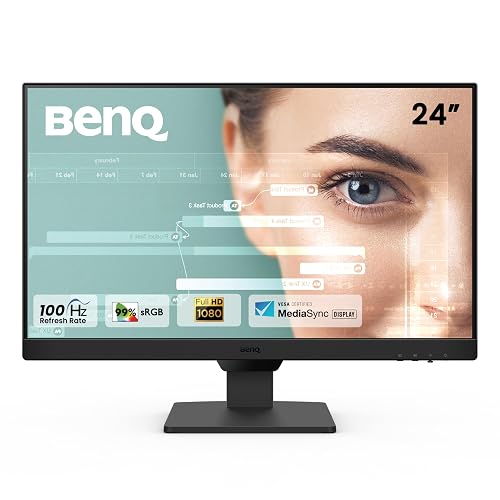
Key specs: 24-inch IPS / Full HD / 100Hz / 99% sRGB / Eye-CareU / dual HDMI + DisplayPort
Why we picked it: BenQ focuses on eye comfort, and the GW2490 has the most ratings here, about 2,400, with a 4.4 rating. Two HDMI ports and DisplayPort make it easy to connect a laptop and a desktop.
Pros
- Most ratings on this list
- Eye-care features
- Dual HDMI and DisplayPort
Cons
- 100Hz is lower than the gaming picks
- No built-in speakers listed
3. Lenovo L24-4C 24-inch: best with speakers

Key specs: 24-inch IPS / Full HD / 144Hz / 1ms / 99% sRGB / 2 x 3W speakers / ultraslim
Why we picked it: The L24-4C adds built-in speakers to a 144Hz IPS panel, which saves desk space. It has a 4.4 rating, though from fewer ratings, about 380.
Pros
- Built-in 2 x 3W speakers
- 144Hz with 99% sRGB
- Slim design
Cons
- Fewest ratings here
- Built-in speakers are basic compared with external ones
4. LG 24GS65F UltraGear 23.8-inch: best for gaming

Key specs: 23.8-inch IPS / Full HD / 180Hz / 1ms / NVIDIA G-Sync compatible
Why we picked it: At 180Hz, the LG UltraGear has the fastest refresh rate here and is G-Sync compatible, which suits gamers. It has a 4.4 rating from about 740 ratings.
Pros
- Fastest refresh rate here at 180Hz
- G-Sync compatible
- LG’s UltraGear gaming line
Cons
- Pricier than the Acer
- High refresh rates need a capable graphics card
5. Dell S2425HSM 24-inch: best premium pick

Key specs: 24-inch IPS / Full HD / 144Hz / 1ms / 99% sRGB / 300 nits / Ash White
Why we picked it: The Dell has the highest rating here, 4.5 stars from about 680 ratings, with a 144Hz panel and an Ash White finish that suits home offices.
Pros
- Highest rating on this list
- 144Hz and 99% sRGB
- Attractive white design
Cons
- Most expensive pick
- Fewer ratings than the BenQ
How to choose a monitor
Size and resolution go together. At 24 inches, Full HD is sharp enough for most people. For bigger screens or detailed photo work, consider 27-inch QHD, which costs more.
Refresh rate matters most for gaming and smooth scrolling. 100Hz is a nice upgrade over 60Hz, while 144Hz and above suits fast games if your PC can run them.
- Ports: check HDMI, DisplayPort and whether your laptop needs USB-C.
- Stand: tilt is common, height adjustment is rare at this price.
- Eye comfort: flicker-free and low blue light modes help with long hours.
- VESA mount: needed if you plan to use a monitor arm.
For more background, see Wikipedia’s article on IPS panels.
Our final word
For work and study, the BenQ GW2490 is the best choice, with eye-care features and plenty of ports. For gaming, the LG 24GS65F at 180Hz is the pick.
On a budget, the Acer EK240Y P6 gives 144Hz for under ₹6,000, the Lenovo L24-4C adds speakers, and the Dell S2425HSM has the top rating.
Prices and stock change quickly, so check the current price on Amazon before you buy any of these monitors.
Frequently asked questions
Is a 24-inch monitor good for laptops?
Yes. A 24-inch Full HD monitor connected over HDMI gives you a much larger workspace than a laptop screen.
Do I need 144Hz for office work?
No. It makes scrolling smoother, but 60Hz to 100Hz is fine for office work. High refresh rates matter most for gaming.
Do these monitors have speakers?
Among these picks, the Lenovo L24-4C lists built-in speakers. For the others, plan on separate speakers or headphones.
Final word: when you compare options for the best monitors under 15000 in India, match the pick to your budget and how you plan to use it. Prices on Amazon.in change often, so check the current listing before you buy. This guide on the best monitors under 15000 in India is updated whenever prices or availability change, so bookmark it and check back. Still deciding? Go back to the picks at a glance and weigh each of the best monitors under 15000 in India against your budget.