
Affiliate disclosure: TeckAtlas is reader-supported. If you buy through links on this page, we may earn a commission at no extra cost to you. Learn more.
Last updated: 10 October 2026. Prices change often, so always check the current price before you buy.
Looking for the best USB-C hubs in India? Many new laptops have only a couple of USB-C ports, which makes it hard to connect a monitor, a pen drive and a charger at the same time. A USB-C hub adds those ports back.
We compared five USB-C hubs on Amazon.in, from a simple 3-in-1 HDMI adapter to 8-in-1 hubs with Ethernet and card readers.
Table of Contents
Best USB-C hubs in India: our picks at a glance
| Product | Best for | Price* | Buy |
|---|---|---|---|
| UGREEN Revodok 5-in-1 | a reliable everyday hub | ₹1,424 | Buy on Amazon.in |
| Portronics C-Konnect 3-in-1 | just adding a monitor | ₹499 | Buy on Amazon.in |
| Amazon Basics 8-in-1 | wired internet at a low price | ₹719 | Buy on Amazon.in |
| STRIFF HubMaster 8-in-1 | many ports at the lowest price | ₹440 | Buy on Amazon.in |
| Acer 7-in-1 | reading SD cards | ₹1,945 | Buy on Amazon.in |
*Prices as seen on Amazon.in on 10 October 2026. They change often, so check the current price on Amazon.
How we chose these USB-C hubs
To shortlist the best USB-C hubs in India, we looked at USB-C hubs on Amazon.in that were in stock, well rated and backed by a healthy number of owner reviews. We compared:
- Ports: HDMI, USB-A, Ethernet, SD card and pass-through charging.
- Display output: 4K resolution and refresh rate over HDMI.
- Charging: maximum USB-C Power Delivery pass-through.
- Price and reviews: price on Amazon.in, star rating and number of ratings.
We have not tested these USB-C hubs ourselves. Our picks come from published specifications, Amazon.in listings and owner reviews, so treat them as a research shortlist rather than a hands-on verdict.
1. UGREEN Revodok 5-in-1 USB-C Hub: best overall
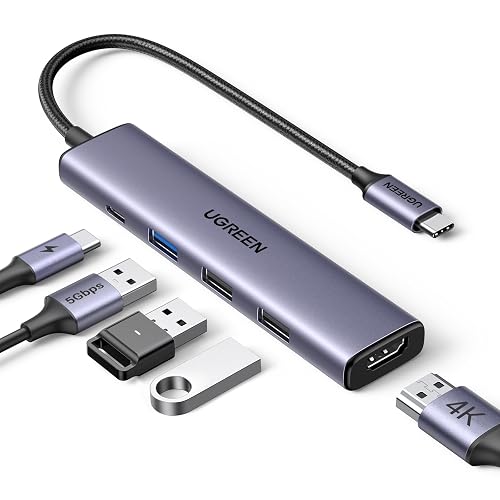
Key specs: 5-in-1 / 4K HDMI / 100W PD charging / 3 x USB-A data ports
Why we picked it: The UGREEN Revodok has by far the most ratings here, about 31,500, with a 4.4 rating. It covers the basics most people need: HDMI, three USB-A ports and charging pass-through.
Pros
- Most ratings by a wide margin
- 100W PD pass-through
- Three USB-A ports
Cons
- No Ethernet or SD card slot
- Costs more than budget hubs
2. Portronics C-Konnect 3-in-1: best budget HDMI adapter

Key specs: 3-in-1 / HDMI 4K at 30Hz / USB 3.0 / USB-C
Why we picked it: If you mainly need HDMI for a TV or monitor, the C-Konnect does that for about ₹499. It has about 10,800 ratings.
Pros
- Low price
- Compact
- HDMI plus a USB port
Cons
- 4K is limited to 30Hz
- Lower 3.9 rating
3. Amazon Basics 8-in-1 USB-C Hub: best with Ethernet

Key specs: 8-in-1 / 4K HDMI / Ethernet (100 Mbps) / aluminium body / HDCP support
Why we picked it: This hub adds an Ethernet port for wired internet, plus HDMI and more, for under ₹750. It has a 4.2 rating from about 2,000 ratings.
Pros
- Ethernet port
- 8 ports for a low price
- Aluminium body
Cons
- Ethernet is 100 Mbps, not gigabit
- Fewer ratings than UGREEN
4. STRIFF HubMaster 8-in-1: best value 8-in-1

Key specs: 8-in-1 / 4K HDMI / 100W PD pass-through / universal Type-C
Why we picked it: The HubMaster packs eight ports and 100W charging pass-through into a hub that costs about ₹440. It has a 4.1 rating from about 1,500 ratings.
Pros
- Lowest price here
- 8 ports
- 100W PD pass-through
Cons
- Lesser-known brand
- 4.1 rating
5. Acer 7-in-1 USB-C Hub: best for photographers

Key specs: 7-in-1 / 4K HDMI / SD card reader / USB ports
Why we picked it: The Acer hub includes an SD card reader, which suits photographers moving files from a camera. It has a 4.3 rating from about 840 ratings.
Pros
- SD card reader
- Known laptop brand
- 4.3 rating
Cons
- Most expensive here
- Fewer ratings than the UGREEN
How to choose a USB-C hub
List the ports you actually use. For a monitor, HDMI is essential. For video calls on shaky Wi-Fi, Ethernet helps. Photographers need an SD card reader.
Check that your laptop’s USB-C port supports video output (often called DisplayPort Alt Mode) and charging, otherwise the HDMI port may not work.
- HDMI refresh rate: 4K at 60Hz is smoother than 4K at 30Hz.
- Pass-through charging: match the wattage to your laptop charger.
- Heat: aluminium hubs dissipate heat better.
- Cable length: short cables are compact but can strain the port.
For more background, see Wikipedia’s article on USB-C.
Our final word
The UGREEN Revodok 5-in-1 is the best all-rounder, with a huge number of ratings. The Amazon Basics 8-in-1 is the value pick if you need Ethernet.
For the lowest price, the STRIFF HubMaster gives eight ports, the Portronics C-Konnect is fine for HDMI only, and the Acer adds an SD card reader.
Prices and stock change quickly, so check the current price on Amazon before you buy any of these USB-C hubs.
Frequently asked questions
Will a USB-C hub work with any laptop?
Most hubs work with any USB-C laptop for data. HDMI output and charging need a USB-C port that supports video and Power Delivery.
Can I charge my laptop through a USB-C hub?
Yes, if the hub has PD pass-through and you connect your laptop’s USB-C charger to it.
Do USB-C hubs work with phones?
Many do. Phones that support video output over USB-C can use the HDMI port too.
Final word: when you compare options for the best USB-C hubs in India, match the pick to your budget and how you plan to use it. Prices on Amazon.in change often, so check the current listing before you buy. This guide on the best USB-C hubs in India is updated whenever prices or availability change, so bookmark it and check back. Still deciding? Go back to the picks at a glance and weigh each of the best USB-C hubs in India against your budget.