Affiliate disclosure: TeckAtlas is reader-supported. If you buy through links on this page, we may earn a commission at no extra cost to you. Learn more.
Last updated: 11 October 2026. Prices change often, so always check the current price before you buy.
Looking for the best 144Hz gaming monitor in India? A 144Hz gaming monitor refreshes the picture more than twice as often as a basic 60Hz screen, so fast games look smoother and feel more responsive. Prices have dropped a lot, and you can now get an IPS panel with 144Hz for well under ₹11,000.
We compared five 144Hz gaming monitor models on Amazon India, priced from ₹6,225 to ₹10,649. We have not tested them hands-on. Our picks are based on the maker’s listed specs, price and buyer ratings, so check that your PC or console can actually output 144 frames per second before you buy.
Table of Contents
Best 144Hz gaming monitor: our picks at a glance
Here are all five picks for the best 144Hz gaming monitor, side by side. Every link goes to Amazon India.
| Product | Best for | Price* | Buy |
|---|---|---|---|
| Acer EK240Y P6 23.8-inch | the lowest price | ₹6,225 | Check on Amazon |
| Samsung 24-inch G3 Gaming Monitor | Samsung gaming features | ₹7,999 | Check on Amazon |
| MSI MAG 255F E20 24.5-inch | competitive games | ₹8,599 | Check on Amazon |
| LG 24GS65F UltraGear 23.8-inch | games and media | ₹9,799 | Check on Amazon |
| Dell S2425HSM 24-inch | work and play | ₹10,649 | Check on Amazon |
*Price as listed on Amazon India on 11 October 2026. It can change at any time.
How we chose these 144Hz gaming monitors
We only included a 144Hz gaming monitor if it has an IPS panel, a 144Hz or faster refresh rate, FreeSync or a similar sync feature and a Full HD resolution at 24 inches, which is the sweet spot for budget gaming PCs. We then compared response time, brightness, colour coverage, speakers and ratings.
Prices and ratings were noted on 11 October 2026 and will change, so treat them as a guide.
1. Acer EK240Y P6 23.8-inch: best budget pick

Key specs: 23.8-inch IPS / FHD / 144Hz / 1 ms VRB / AMD FreeSync / frameless
Why we picked it: The Acer EK240Y is the cheapest 144Hz gaming monitor in our list and also the most-rated, with a 4.4 rating from about 1,050 buyers. It has an IPS panel, FreeSync and a frameless design.
Pros
- Lowest price here
- About 1,050 ratings
- IPS panel with 178-degree viewing
- AMD FreeSync
Cons
- Basic stand with tilt only
- No built-in speakers mentioned
2. Samsung 24-inch G3 Gaming Monitor: best brand value

Key specs: 24-inch IPS / FHD / 144Hz / 1 ms MPRT / FreeSync / 95% sRGB / Eye Saver mode
Why we picked it: Samsung’s G3 brings gaming extras such as Black Equalizer and Virtual Aim Point to a budget 144Hz gaming monitor. It has a 4.5 rating from about 170 buyers and an Eye Saver mode for long sessions.
Pros
- Highest rating here (4.5, tied)
- Black Equalizer and Virtual Aim Point
- 95% sRGB
- Eye Saver and flicker-free modes
Cons
- 250 nits brightness is modest
- Fewer ratings than the Acer
3. MSI MAG 255F E20 24.5-inch: fastest refresh
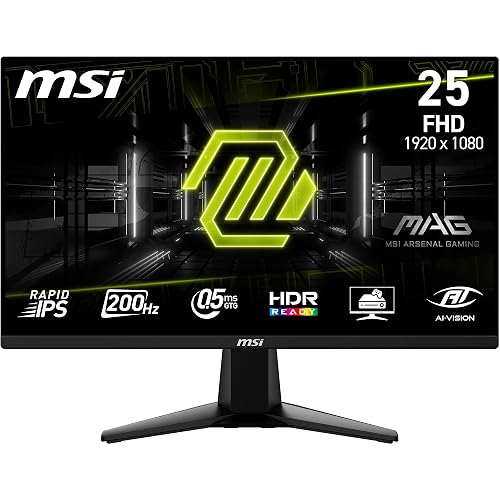
Key specs: 24.5-inch Rapid IPS / FHD / 200Hz / 0.5 ms / frameless
Why we picked it: The MSI MAG 255F goes beyond 144Hz with a 200Hz Rapid IPS panel and a 0.5 ms response time. If you play competitive shooters, it is the fastest 144Hz gaming monitor alternative in our list, with a 4.5 rating from about 290 buyers.
Pros
- 200Hz refresh rate
- 0.5 ms response time
- Slightly larger 24.5-inch panel
- 4.5 rating
Cons
- Needs a strong GPU to make use of 200Hz
- No speakers
4. LG 24GS65F UltraGear 23.8-inch: best for colour

Key specs: 23.8-inch IPS / FHD / 180Hz / 1 ms / HDR10 / 300 nits / UltraGear
Why we picked it: LG’s UltraGear 24GS65F is a 180Hz 144Hz gaming monitor upgrade with HDR10 support and 300 nits brightness. It has a 4.4 rating from about 740 buyers and LG’s Smartchoice backing.
Pros
- 180Hz with 1 ms response
- HDR10 support and 300 nits
- About 740 ratings
- UltraGear gaming features
Cons
- Costs more than the Acer and Samsung
- HDR on a budget panel is limited
5. Dell S2425HSM 24-inch: best with speakers

Key specs: 24-inch IPS / FHD / 144Hz / 99% sRGB / 300 nits / built-in speakers / height-adjustable
Why we picked it: The Dell S2425HSM is a 144Hz gaming monitor that also works well as an everyday screen, with built-in speakers, 99% sRGB colour and a height-adjustable stand. It has a 4.5 rating from about 680 buyers.
Pros
- Built-in speakers
- 99% sRGB and 300 nits
- Height-adjustable stand
- 4.5 rating from about 680 buyers
Cons
- Most expensive pick
- Ash white finish may not suit every desk
How to choose a 144Hz gaming monitor
First, match the monitor to your hardware. A 144Hz gaming monitor only helps if your graphics card or console can push more than 60 frames per second in the games you play. Check your GPU’s performance at 1080p before you spend extra on 180Hz or 200Hz.
Next, look at panel type and response time. IPS panels give better colours and viewing angles than TN or VA. A 1 ms response time (MPRT or VRB) is standard at this price. Make sure the monitor has FreeSync or G-Sync compatibility to avoid tearing; you can read more about variable refresh rate.
Finally, check ports and extras. DisplayPort or HDMI 2.0 is needed for 144Hz at 1080p. Speakers and a height-adjustable stand make a 144Hz gaming monitor nicer for daily work. For general-purpose screens, see our best monitors under ₹15,000 guide.
Our final word
The Acer EK240Y is our pick of 144Hz gaming monitor for most budget gamers, with a huge rating count and the lowest price. The MSI MAG 255F is the one for competitive play, and the Dell S2425HSM is best if you also work on the same screen.
Prices and stock change quickly, so check the current price on Amazon before you buy any 144Hz gaming monitor.
Frequently asked questions
Is a 144Hz gaming monitor worth it?
Yes, if your PC or console can run games above 60 fps. The smoother motion is easy to notice in shooters and racing games.
Do I need DisplayPort for 144Hz?
At 1080p, HDMI 2.0 or DisplayPort both support 144Hz. Older HDMI 1.4 ports may be limited to 120Hz or less.
Which is better, 144Hz IPS or 165Hz VA?
IPS gives better colours and viewing angles; VA gives deeper blacks. For most gamers an IPS 144Hz gaming monitor is the safer choice.
Can a PS5 or Xbox use a 144Hz gaming monitor?
Yes. Both consoles support 120Hz at 1080p over HDMI, so you benefit from the faster panel even if you do not reach 144Hz.